.png)
Keep your context
Work from the Claude, ChatGPT, Perplexity, or Gemini conversation that already contains your research.
Swiss Cheese AI / MCP connection guide
Connect Claude, ChatGPT, Perplexity, or Gemini Spark to Swiss Cheese AI. One hosted MCP endpoint brings SCAI's multi-model debate into the conversation already on your screen.
https://www.swisscheeseai.com/api/mcp
SCAI × ChatGPT / Live workflow
Stay in the conversation you already use. Ask ChatGPT to call SCAI, let the model council challenge the answer, and receive one integrated conclusion in the same chat.
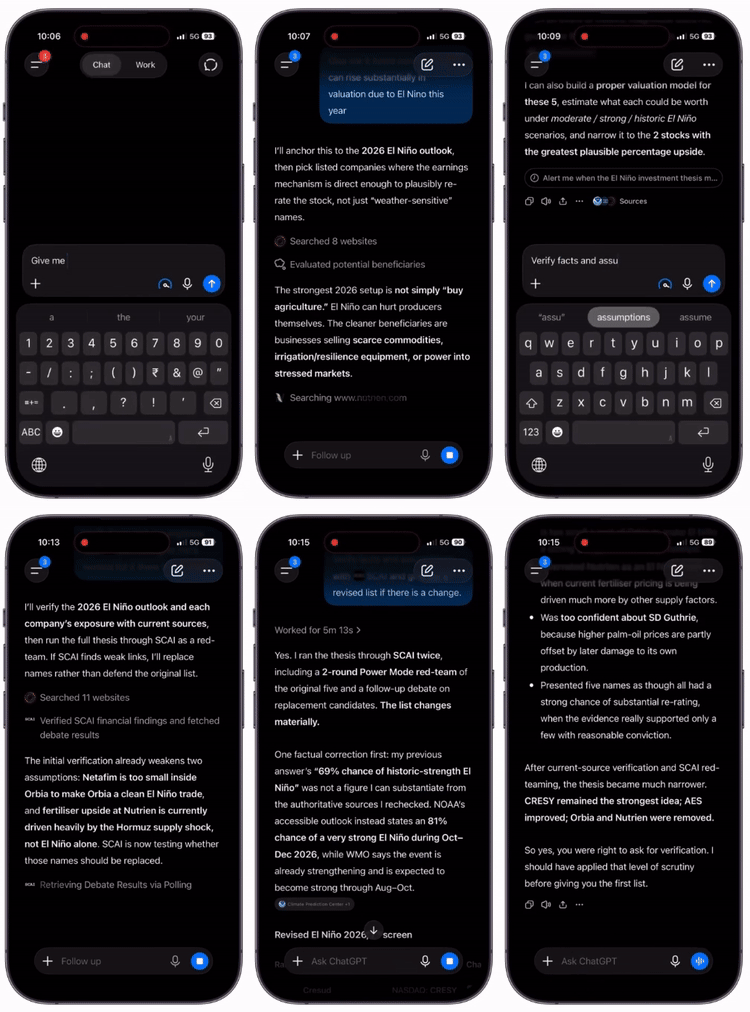
00 / Orientation
Model Context Protocol gives an AI host a standard way to call an external tool. With SCAI connected, you can send a prompt or an existing answer to an AI council without moving the conversation to another tab.
Work from the Claude, ChatGPT, Perplexity, or Gemini conversation that already contains your research.
Ask the host to use SCAI. The connector starts a structured multi-model debate on your behalf.
The integrated conclusion returns to the host, with the strongest reasoning and remaining uncertainty made clear.
00.5 / Connector, decoded
MCP is the bridge—not a new place to work. Your AI host keeps the conversation, sends only the context you approve to SCAI, and receives the council's integrated answer.

In ChatGPT or another supported host, approve the SCAI tool call. MCP carries the relevant request—no copy-and-paste detour.

The host sends the approved context through the connector, so the SCAI council can generate, challenge, and compare perspectives on the same question.

SCAI returns one integrated result through MCP. Your original host presents it in the same conversation, with the flow and context intact.
01 / Setup
Each guide uses the same SCAI endpoint. Setup usually takes a few minutes. Availability can depend on your plan, workspace settings, region, and each host's current rollout.
MCP custom connector Claude setup for the web app or Claude Desktop.
OAuth 2.1 + PKCEhttps://www.swisscheeseai.com/api/mcp
Looking for an MCP custom connector with no client ID? SCAI uses dynamic client registration on supported OAuth hosts, so Claude does not need credentials configured by hand.
MCP custom connector ChatGPT setup through a custom app.
Plan access may varyhttps://www.swisscheeseai.com/api/mcp
OpenAI may label MCP integrations “apps” rather than “connectors.” The setup still points ChatGPT to SCAI's hosted Model Context Protocol endpoint.
MCP custom connector Perplexity setup for a second opinion inside research.
Custom connectorhttps://www.swisscheeseai.com/api/mcp
Perplexity can remain your research interface; SCAI adds a generator–evaluator–integrator review without replacing that workflow.
Gemini Spark MCP connector setup through Connected Apps.
Betahttps://www.swisscheeseai.com/api/mcp
Gemini Spark support is beta. Interface labels, access, and authentication options may change during Google's rollout.
02 / MCP protocol tutorial
This remote MCP server example keeps the host as your interface. SCAI exposes its council as a tool, receives the approved request, runs the debate, and returns the result.
03 / Authentication
SCAI uses the security flow supported by each host. You can inspect the requested access, approve the first tool call, and disconnect the integration from your host settings.
This MCP server with OAuth PKCE example avoids placing a reusable secret in the browser. PKCE binds authorization to the client that began it.
Claude can use MCP dynamic client registration. Leave OAuth Client ID and Client Secret blank and let the connector register itself.
The MCP consent screen example shows requested access before connection, including debates, available SCAI resources, and credit use.
The product behind the connector
SCAI is an AI council: a structured AI debate tool that uses different model roles to propose, challenge, and integrate an answer. It can act as an AI panel of experts and an AI panel review without pretending that disagreement is the same as truth.
Use it for cross-model AI verification, multi-model AI consensus, or a second opinion when the cost of an unchecked assumption is high. The goal is stronger scrutiny—not a cosmetic AI answer confidence score.
If you are comparing a Perplexity alternative, Consensus AI alternative, You.com alternative, or the best AI for accurate answers, SCAI takes a different position: it is an AI tool that uses multiple models inside the assistant you already chose.
04 / Where SCAI fits
SCAI is most useful as a review layer inside the assistant you already prefer. These comparisons answer different questions—not interchangeable product categories.
Use Perplexity for research; call SCAI when you want several models to challenge and integrate the answer. The MCP connector lets both workflows coexist.
Separate source discovery from cross-model debate. SCAI's defining feature is its generator–evaluator–integrator council.
Connect SCAI to either supported host and run the same council from the interface and context you prefer.
Compare host support, model roles, consent, history, and pricing against your workflow rather than relying on a generic “best” label.
05 / MCP connector FAQ
Practical answers about support, authentication, credits, and what a multi-model review can—and cannot—prove.
It is a hosted remote Model Context Protocol server that exposes Swiss Cheese AI's council as tools. A supported AI host can call SCAI, run a multi-model debate, and bring the integrated result back into your original conversation.
Use the platform guide above to add MCP server to Claude, add MCP server to ChatGPT, or add MCP server to Perplexity. Each flow starts with the same SCAI endpoint, then uses the host's custom connector or custom app settings.
This page covers Claude, ChatGPT, Perplexity, and Gemini Spark beta. Support can vary by subscription, workspace policy, region, and the current feature rollout in each host.
Not in Claude: leave both fields blank. SCAI supports dynamic client registration, which lets the host register itself during the OAuth flow. Follow the platform-specific authentication instruction for other hosts.
Yes. Debates launched through a connector use your SCAI credits and appear in your SCAI history with the source host identified.
No. Independent critique can expose more blind spots than an unchecked response, but an AI verified answer is not a guarantee of truth. Verify medical, legal, financial, safety-critical, and other high-stakes outputs with qualified sources.
Add SCAI to ChatGPT and ask it to debate the answer. The evaluator looks for weak assumptions and conflicts; the integrator produces a revised conclusion with uncertainty. This supports AI hallucination detection, how to reduce AI hallucinations, and how to fact-check ChatGPT—but primary evidence still matters.
Accuracy depends on the question, context, model, tools, and evidence. Treat every AI answer as a claim to assess—not automatic truth. Primary sources and qualified human review remain essential when the cost of error is high.
SCAI is a hosted remote MCP service, so you do not configure transport state yourself. Your account, consent, debate history, and credits are handled by the service while the host uses its supported MCP transport.